The LIV app
is the must-have
for your rental matters
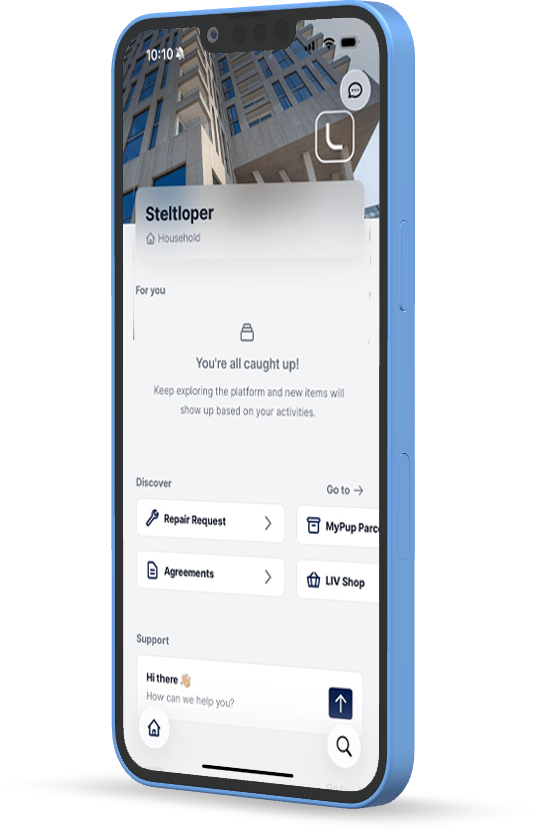
The LIV app is designed to make it easier for you as a tenant
Exclusively for LIV Residential tenants, the LIV app is available. In the app, you can find all kinds of things concerning the rental of your property and any facilities. For example, you can quickly have important documents in your hand, easily submit a repair request, and stay up to date on all the news in and around your building and rental situation.

Repair Request

with LIV Residential

key information

with the news feed

Access the app
Did you receive an invitation to the LIV app by e-mail?
Then the LIV app is available for your home!
-
1
Download the LIV app
Search the App Store or Google Play store for: 'LIV Residential 2.0', or scan the QR code opposite. Please note: the LIV app is available on phone and via the web version: livresidential.chainels.com
-
2
Activate your LIV app
Activate your LIV app with the temporary password you received by email. With this password and your email address, you will gain access to your community and home in the app.
-
3
Change password
Upon first login, you will be asked to change your password to a personal password
-
4
You are here!
It's done: you can use the LIV app.
Running into something? Do you have a question?
We'd love to hear from you!
Email questions about the app to support@livresidential.nl.
Didn't receive an invitation by email? But is the app available
In your building? Email our team at support@livresidential.nl
We'll be happy to help you get started!
What functionalities does the LIV app offer?
Note: not every functionality is (yet) available in every building
via the LIV app
Exclusive to LIV tenants
Via chat & help
for LIV tenants
via the news feed
manuals and instructions